
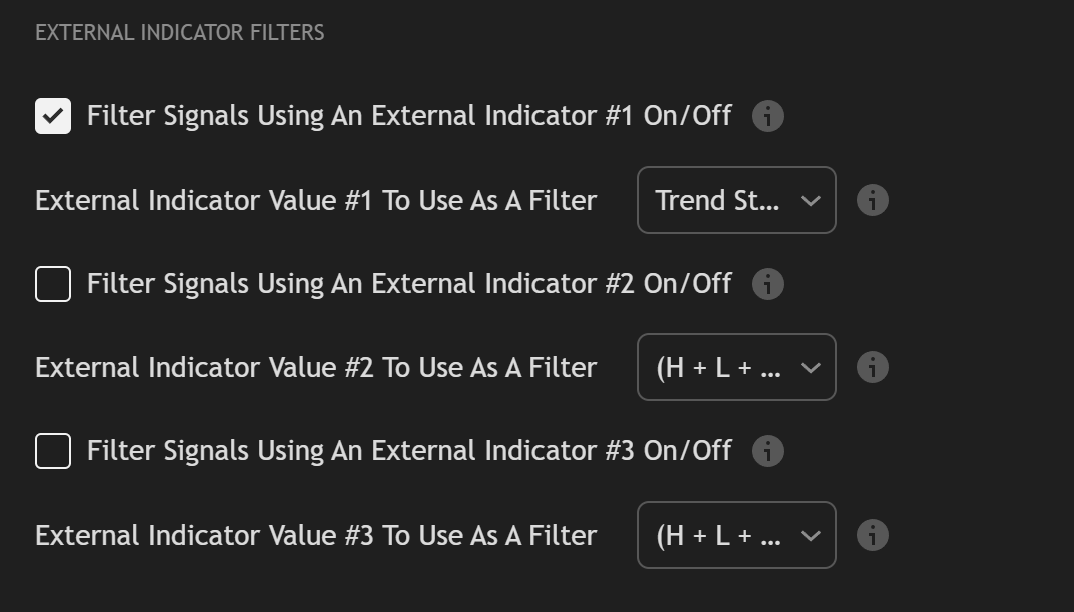
Some of Trend Friend‘s signal indicators include a built-in trend filtering system that uses external TradingView indicators to control when signals can fire. You can connect up to three filter indicators and the signal indicator will only output buys or sells when their direction agrees, eliminating counter-trend signals without manual chart watching.
We will update this list as we publish new versions of our indicators and add the filtering features to each indicator.
LD By Lane Dotson · Last updated
These indicators have the capabilities to be able to accept a trend direction from up to 3 different external indicators which will prevent any buy or sell signals from coming in unless they are in the same direction as the external indicators you use as filters.
These indicators can be used as external filters to prevent one of the signal generating indicators from giving signals that are not in the same direction as the external indicator you are using.
Note: You can see from the lists, that our signal generating indicators can also be used as external indicator filters. This means that you can use multiple signal generating indicators together so that they can only give signals in the same direction as the other indicator. You can also use the same indicators but with different settings such as scalp mode on one indicator and then filtering it with the same indicator on swing mode.

To filter the signals of one of our indicators that has this capability, you MUST use an external indicator that has a specific output that can be used by the signal generating indicator in order for it to work properly.
We have built an output into the above listed indicators that provides a 1, -1 or 0 value which is how the external indicator communicates with the signal generating indicator. A 1 value means that the signal generating indicator is only allowed to give buy signals. A -1 value means that the signal generating indicator is only allowed to give sell signals. A 0 value means that the signal generating indicator is not allowed to give buy or sell signals.
Due to how this is set up, you must use an external indicator that provides this 1, -1, 0 value as a trend direction output. We have added this output to multiple of our indicators which you can find in the source dropdown named like this: Indicator Name: Trend Direction To Send To External Indicators.
So if you want to use our Trend Strength indicator as a filter on the 1 Minute Scalping Indicator, go into the settings panel for the 1 Minute Scalping Indicator, turn on External Indicator Filter #1 and then in the source dropdown menu, scroll to where it says Trend Strength: Trend Direction To Send To External Indicators.
You can add up to 3 external indicator filters by following the same process mentioned above, but make sure you are selecting an indicator that has the trend filter outputs and that you select the correct source which will be the name of the indicator, followed by Trend Direction To Send To External Indicators.
Our future plans for filtering capabilities are to add the filtering code to many of our free indicators and premium trading indicators, build out some custom indicators that are meant specifically to be used as filters and add some other types of filters that are not trend based, such as volume, volatility, time or session based and more.
If you would like to create your own custom indicators to use as a filter on our signal generating indicators, you can add the following code to your indicator and customize it to your specific needs:
					trendDirection = 0

if close > ema1
    trendDirection := 1
else if close < ema1
    trendDirection := -1
else
    trendDirection := 0

plot(trendDirection, title="Trend Direction To Send To External Indicators", color=#00000000, display=display.data_window)
Only if that indicator has a plot output that provides a 1, -1, or 0 value representing trend direction. Our filtering system reads that specific output format. You can add the required code to any custom indicator you build yourself, but third-party indicators would need that same output structure to work as a filter.
No. You can use just one, two, or all three external indicator filter slots. Each filter you enable adds an additional layer of confirmation before a signal is allowed through. Using one filter is completely valid.
Yes. That is the purpose of filtering, to remove signals that go against the direction of your filter indicators. You will see fewer total signals, but the signals that do come through will be aligned with the trend direction of your chosen filters, which can improve signal quality.
GET MORE FROM YOUR INDICATORS
See all of the premium and free indicators that support signal filtering and trend direction outputs.