Premium Indicator

1 Minute Scalping Indicator for TradingView

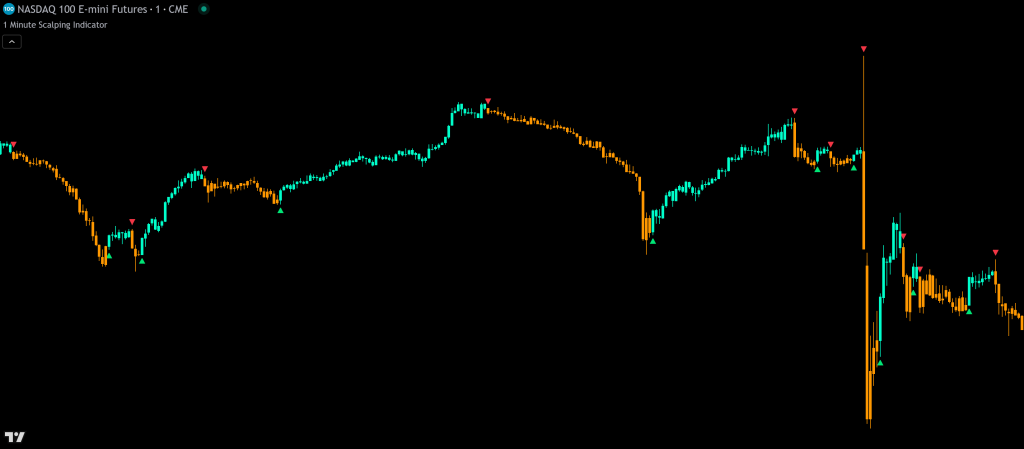
1 Minute Scalping Indicator on a TradingView chart showing price action signals with candle coloring, stop loss, and take profit levels

The 1 Minute Scalping Indicator is a TradingView tool that generates buy and sell signals from pure price action, comparing the current candle to the previous candle so there’s no lag from other indicators. Three trade modes (Fast, Medium, Smooth But Fast) let you control reaction speed and how long positions are held.

The indicator includes candle coloring that paints according to the direction price is currently moving, automatic trailing stop loss, three take profit levels, auto trend filtering using built-in moving averages, and the ability to filter signals using up to 3 external indicators for maximum confluence.

Built by Lane Dotson · Last updated · View on TradingView →
Part of the Premium Indicator Suite - 10 indicators for $39.99/mo. View suite → Pricing →
1 Minute Scalping Indicator settings panel showing trade modes, signal parameters, and filtering options
Settings panel: trade mode selection, signal parameters, and higher timeframe candle filter configuration.
1 Minute Scalping Indicator with external trend filter settings applied showing filtered signals in trend direction only
External indicator trend filtering applied. Signals only fire in the direction confirmed by the external trend filter.
1 Minute Scalping Indicator on SPY with auto trend filtering using moving averages
SPY on the 1-minute chart with auto trend filtering using short and long moving averages. Only signals in the trend direction are shown.

WHAT IT DOES

Core Features

Three Trade Modes

  • Fast (formerly Scalp Mode): Compares the current candle to the previous candle. Provides the fastest entries and exits
  • Medium (formerly Swing Mode): Only gives signals when price action parameters are met AND the close is higher than the previous high (bull) or lower than the previous low (bear)
  • Smooth But Fast (default, recommended): Customizable reaction speed via the “Number Of Previous Candles To Analyze For Signals” setting. Lower numbers react faster, higher numbers hold positions longer. Only affects some signal triggers so it still catches major moves early
All modes use the same core algorithm from the Higher Timeframe Price Action Scanner.

Buy & Sell Signal Arrows

Green up arrows indicate bullish price action, red down arrows indicate bearish. Yellow arrows appear when conditions are met but the candle has weak characteristics (small body, large wicks). Wait for confirming price action before following yellow signals.

Arrow sizes are adjustable (small, medium, large). Unconfirmed signals while the candle is still open display as partially transparent. Once the candle closes, the arrow becomes fully solid.

Signal Warning System

  • Yellow caution dots: Appear when small candles or other parameters suggest waiting for confirmation
  • X crosses: Appear when a signal is immediately reversed on the very next candle as a warning to exit immediately or use a tight stop loss

Both can be independently toggled on or off.

Price Action Candle Coloring

Candles paint according to the detected price action direction, helping reduce anxiety while watching candles bounce back and forth. Colors are customizable and can be turned off if you prefer standard candles. You must turn off your chart’s built-in candle coloring for this to display.

Automatic Trailing Stop Loss

The stop loss finds the highest high or lowest low of the past X candles (Candle Trail Length) and adds a buffer based on average candle size multiplied by your chosen multiple. It updates automatically on every new bar and flips when an opposing signal comes in.

Trailing Stop Loss Mode: After taking a confirmed signal, enable this to suppress all new signals and trail your stop until it’s hit. The stop line turns orange when hit. Turn the mode off manually after exiting.

Take Profit Levels

Three configurable take profit levels using average candle size multiplied by your chosen multiples (default: 3x, 6x, 9x). Levels calculate from where the most recent signal locked in at candle close and don’t change until an opposing signal is confirmed.

Candle Size Rejection

Optional filter that rejects signals on small candles that breach market structure. Default is off. When off, signals fire regardless of candle size. When on, it helps avoid false signals but may occasionally cause late entries during fast moves.

HOW TO TRADE WITH IT

Trading Applications

Scalping the 1-Minute Chart

Use Smooth But Fast mode with the default settings for quick entries and exits. Watch for green arrows at support levels and red arrows at resistance levels. Use the auto trend filtering or external indicator filters to only take signals in the trend direction.

Using Trailing Stop Mode

Take a confirmed signal entry, then enable Trailing Stop Loss Mode. This suppresses all new signals and trails your stop automatically. Hold until your stop is hit to maximize the trade. Turn the mode off once you exit to resume normal signals.

Higher Timeframe Candle Filter for Holding Longer

Enable the Higher Timeframe Candle Filter to prevent new signals until the previous higher timeframe candle’s high or low has been passed. This smooths out signal frequency and helps hold trades longer. Works well during low volatility. Turn it off during major volatility for the earliest entries and exits.

TRADE WITH THE TREND

Signal Filtering

Auto Trend Filtering with Moving Averages

A built-in trend filtering feature uses two custom moving averages for trend detection. Four modes:

  • Off: No signal filtering
  • Short MA Only: Buy signals only when price is above the short MA, sell signals only when below
  • Long MA Only: Buy signals only when price is above the long MA, sell signals only when below
  • Both Short & Long MAs: Buy signals only when price is above both MAs, sell signals only when below both

The auto trend filtering works on the 15s, 30s, 1m, 2m, 3m, and 5m charts. Other timeframes are not supported. Use external indicator filters instead. The short and long moving averages can be displayed on the chart independently of whether the auto filter is enabled.

When auto filtering is active, candles that meet the trend parameters show in your chosen bull/bear colors. Gray candles indicate neutral conditions to help you stay out of trades.

External Indicator Trend Filters

Filter signals using up to 3 external indicators that output 1 (bullish), -1 (bearish), or 0 (neutral). Only buy signals fire when the external indicator shows bullish, only sell signals when bearish, and no signals when neutral.

Compatible with any Trend Friend indicator that has a “Trend Direction To Send To External Indicators” output, including the Trend Trading Indicator, Scalper Ribbon, and Higher Timeframe Price Action Scanner.

The auto trend filter and external indicator filters can be used simultaneously for maximum filtering.

Trend Direction Output

The indicator outputs its own trend direction value (1/−1/0) that other indicators on the same chart can use as a filter source.

CONFIGURATION

Settings Overview

All settings have tooltips  hover over the “i” icon next to each setting for a detailed explanation.

Signal Settings

Setting Default Description
Trade Mode Smooth But Fast Choose Fast, Medium, or Smooth But Fast
Number Of Previous Candles To Analyze 3 Smooth But Fast only. Lower = faster reactions, higher = holds longer. Only affects some signal triggers
Higher Timeframe Candle Filter Off Prevents new signals until the previous higher timeframe candle's high or low is passed. Select timeframe (2m, 3m, 5m, etc.)
Candle Size Rejection Off Rejects signals on small candles that breach market structure
Auto Signal Filtering Using Moving Averages Off Off, Short MA Only, Long MA Only, or Both Short & Long MAs. Only works on 15s–5m charts
Signal Arrow Size Small Choose small, medium, or large signal arrows

Stop Loss & Take Profit Settings

Setting Default Description
Stop loss On/Off On Toggle the automatic stop loss line and price label
Stop loss Candle Trail Length 3 Number of candles to look back for highest high or lowest low
Stop loss Avg Candle Multiple 3 Average candle height multiplied by this number as buffer beyond the high/low
Trailing Stop Loss Mode Off Suppresses new signals and trails your stop. Turn off after exiting
TP 1 / TP 2 / TP 3 Multiplier 3 / 6 / 9 Average candle height multiplier for each take profit level

External Filter Settings

Setting Default Description
External Filter #1–#3 Off Enable and select an external indicator source that outputs 1 (bullish), -1 (bearish), or 0 (neutral)
Trend Direction Output Always On Outputs 1/−1/0 for other indicators to use as a filter source

Display Toggles

  • Buy/Sell signal arrows (independently toggleable)
  • Caution dots on uncertain signals
  • X crosses for immediately reversed signals
  • Candle coloring (on/off, customizable colors)
  • Moving average lines (short and long, independent of auto filter)
  • Higher Timeframe Candle Filter high/low lines
  • Volume warning label
  • Stop loss and take profit line/label colors
  • Fix Indicator Loading Error checkbox

STAY NOTIFIED

Alerts

Available alert conditions:

  • Buy signal (confirmed on bar close)
  • Sell signal (confirmed on bar close)
  • Stop loss hit
  • Trailing stop loss updated
  • Take profit level 1 / 2 / 3 hit

MARKETS & TIMEFRAMES

Compatibility

The 1 Minute Scalping Indicator works on any market with price data including stocks, crypto, forex, and futures. It works on all timeframes. It’s designed for the 1-minute chart but effective on any timeframe since it uses pure price action.

The auto trend filtering with moving averages is supported on 15s, 30s, 1m, 2m, 3m, and 5m charts only. For other timeframes, use external indicator filters instead.

GOOD TO KNOW

Important Notes & Limitations

Turn off your chart's built-in candle coloring for the indicator's candle colors to display. Go to chart settings → Symbol tab → turn off body, borders, and wick.
Signals may repaint while the candle is still open. Partially transparent arrows indicate unconfirmed signals. Wait for the candle to close for confirmed signals. Alerts only fire on confirmed bar close.
Auto trend filtering only works on 15s, 30s, 1m, 2m, 3m, and 5m charts. On other timeframes, the moving averages will not appear and the auto filter turns off automatically. Use external indicator filters instead.
Trailing Stop Loss Mode must be manually turned off after your stop is hit or you exit. If it won't update after toggling, save your chart layout and refresh your browser.
Higher Timeframe Candle Filter may give late entries during major volatility. Turn it off during fast-moving markets for the earliest entries and exits.

POWER USER TIPS

Tips & Pairings

GET ACCESS

Get the 1 Minute Scalping Indicator
Plus 9 More Premium Indicators

Access the full Premium Indicator Suite on your TradingView charts. All 10 indicators, chart templates, and priority support.

$39.99/month · Cancel anytime · Try it: $24.99 for 2 weeks
10 Premium Indicators
Chart Templates
All Future Updates
Priority Support

COMMON QUESTIONS

Frequently Asked Questions

Fast mode compares the current candle to the previous candle for the fastest reactions. Medium mode requires the close to exceed the previous high or low before signaling. Smooth But Fast is the recommended default. It uses a customizable "Number Of Previous Candles To Analyze" setting that controls reaction speed. Lower numbers react faster, higher numbers hold positions longer. It only affects some signal triggers so it still catches major moves early.
The auto trend filter uses two built-in moving averages to determine trend direction. You can filter signals using the short MA only, long MA only, or both. Buy signals only fire when price is above the selected MA(s), sell signals only when below. This feature only works on 15-second through 5-minute charts. For other timeframes, use external indicator filters instead. The auto filter can be used simultaneously with external filters for maximum filtering.
Yes. The indicator works on all timeframes since it uses pure price action. It's designed and optimized for the 1-minute chart, but works well on any timeframe. The auto trend filtering with moving averages is limited to 15s through 5m charts. On other timeframes, use external indicator filters for trend filtering, or disable filtering entirely.
Yellow arrows appear when all signal conditions are met but the candle has weak characteristics such as small body, large wicks, or other patterns that suggest the signal may not be reliable. Yellow caution dots appear separately when small candles or other parameters suggest extra caution. In both cases, wait for the next candle to show confirming price action before following the signal.
Both indicators use the same price action algorithm. The Higher Timeframe Price Action Scanner applies the algorithm to multiple higher timeframes and shows their trend directions as colored dots. The 1 Minute Scalping Indicator applies it to your chart timeframe and gives you entry signals. Use the scanner as your overall trend guide and the scalping indicator for entries in that direction.

CHANGELOG

Release Notes

Alert Fix

Fixed issues with alerts firing too often.

What Changed
Fixed alerts firing too frequently
Signal Overhaul & Auto Trend Filtering

Major overhaul of signal parameters with new auto trend filtering using built-in moving averages, updated stop loss and take profit calculations, and a candle coloring bug fix.

What Changed
Major overhaul of signal parameters, conditions for new signals, and mitigation of previous version issues
New auto trend filtering with built-in short and long moving averages has 4 modes: Off, Short MA Only, Long MA Only, Both Short & Long MAs
Auto filtering supported on 15s, 30s, 1m, 2m, 3m, and 5m charts. Auto-disabled on other timeframes
Added short and long moving average lines to the chart (independently toggleable)
Updated average candle size calculations for take profit and stop loss levels
Fixed a small candle coloring bug
Pine Script v6, New Trade Modes & External Filtering

Major update with Pine Script v6, 40% faster loading, redesigned trade modes, Higher Timeframe Candle Filter, and external indicator trend filtering.

What Changed
Updated to Pine Script v6 means ~40% faster loading
Trade modes renamed: Scalp → Fast, Swing → Medium. Super modes replaced with Smooth But Fast (default, recommended)
New "Number Of Previous Candles To Analyze For Signals" setting for Smooth But Fast mode
New Higher Timeframe Candle Filter helps hold trades longer by requiring the previous HTF candle's high/low to be passed before a new signal
External indicator trend filtering allows up to 3 external indicators as directional filters (requires 1/−1/0 output)
Trend direction output added for other indicators to use as a filter source
Added fix indicator loading error checkbox
Show older updates
Major Upgrade: Stop Loss, Take Profit & New Modes

Added Super Scalp/Swing/Long Swing modes, automatic trailing stop loss, 3 take profit levels, candle size rejection, false signal warnings, and extensive customization options.

What Changed
Added Super Scalp, Super Swing, and Super Long Swing modes (later replaced by Smooth But Fast in April 2025)
Automatic trailing stop loss with configurable candle trail length and average candle multiple
Trailing Stop Loss Mode suppresses signals and trails until stop is hit
3 customizable take profit levels using average candle size multipliers
Candle size rejection, caution dots, false signal X warnings, and confirmation arrows
Alerts for stop loss hit, trailing stop updated, and take profit levels hit

EXPLORE THE SUITE

Related Indicators

Premium Suite

Uses the same price action algorithm on multiple higher timeframes. The essential companion, use the scanner for overall trend direction and the 1 Minute Scalping Indicator for entries in that trend.

Premium Suite

Tracks large market maker orders and draws adaptive support and resistance levels classified as Large, Huge, or Massive with a multi-ticker scanner. Take 1 Minute Scalping signals at volume-validated levels for the highest probability entries with clear stop loss placement.

Premium Suite

Multi-timeframe trend detection with master trend and trend strength scoring. Use its trend direction output as an external filter for the 1 Minute Scalping Indicator to only get signals in the direction of the established trend.