Higher Timeframe Price Action Scanner for TradingView
The Higher Timeframe Price Action Scanner is a TradingView indicator that shows price action trend direction across multiple higher timeframes as green and red dots in a bottom panel. You can see trends on every selected timeframe in real time and trade in the direction of the higher timeframe trend.
The scanner uses the same algorithm as the 1 Minute Scalping Indicator. three trade modes (Fast, Medium, and Smooth But Fast) with adjustable reaction speed. Each timeframe can be independently toggled on or off, and the scanner outputs its trend direction to other indicators for use as a trend filter. You can also set it to scan a different ticker for cross-market trend confluence.
Part of the Premium Indicator Suite - 10 indicators for $39.99/mo. View suite →Pricing →
WHAT IT DOES
Core Features
Multi-Timeframe Trend Detection
The scanner analyzes price action trends across your selected higher timeframes and displays each as a colored dot. Green for bullish, red for bearish. Each timeframe can be independently turned on or off in settings. Only timeframes that are enabled will appear in the bottom panel, giving you a clean view of just the timeframes that matter for your setup. Timeframes range from 1 minute all the way up to 1 year.
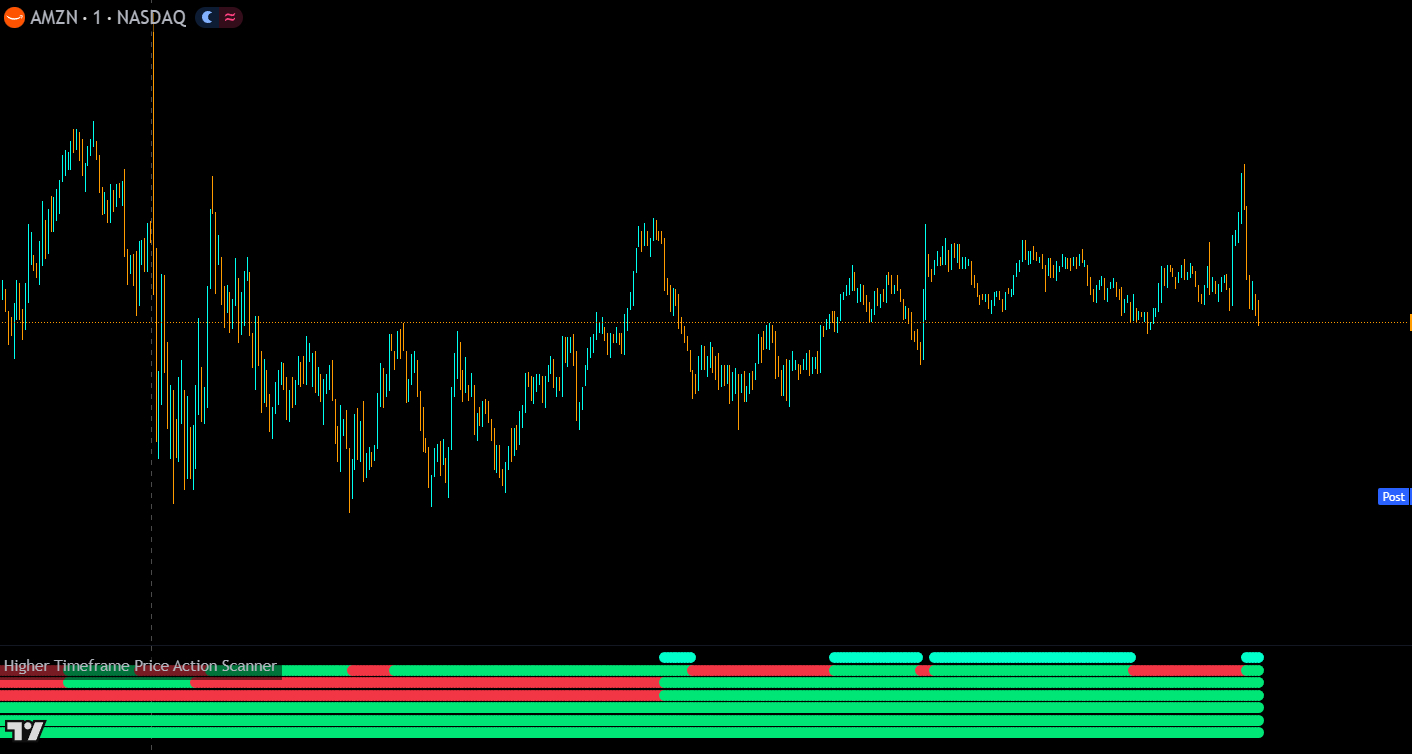
The scanner shows green for uptrend acorss various timeframes and some with red dots for downtrends. All timeframes are bullish at the end which shows blue dots at the top for all timeframe alignment.
Three Trade Modes
Fast (formerly Scalp Mode): Reacts quickly to trend changes. Best for catching every move early
Medium (formerly Swing Mode): Only triggers when price action parameters are met AND the close confirms beyond the previous high/low. It holds positions longer
Smooth But Fast (default, recommended): A customizable mode with adjustable reaction speed via the “Number Of Previous Candles To Analyze” setting. Lower numbers react faster; higher numbers hold positions longer. This mode catches major moves early while smoothing out noise
All-Timeframes Alignment Signals
When a configurable number of timeframes are all in the same signal direction simultaneously, a circle appears on the chart. Light blue on top for bullish, orange on bottom for bearish. The default threshold is 5 timeframes. This helps you spot strong multi-timeframe trend alignment at a glance.
TSLA chart with 2 different sections of all timeframes being aligned in trend direction and showing a blue circle at the top for all timeframe alignment signals.
Confirmed vs. Unconfirmed Signals
You can choose between “Confirmed Only” and “Unconfirmed Is Ok” for how the scanner handles higher timeframe candles that haven’t closed yet. Confirmed Only waits for the higher timeframe bar to close before showing a signal change with no repainting. Unconfirmed Is Ok shows signal changes before the bar closes, which can give you earlier trend change detection but may repaint if the candle reverses before closing.
External Trend Direction Output
The scanner outputs its trend direction for use by other indicators. When all enabled timeframes agree on a buy signal, the output is 1 (bullish). When all agree on a sell signal, the output is -1 (bearish). When timeframes disagree, the output is 0 (neutral).
Set your external indicator’s source to “Higher Timeframe Price Action Scanner: Trend Direction To Send To External Indicators” to filter signals from other indicators that go against the higher timeframe trend.
Cross-Ticker Scanning
The scanner can be set to analyze a different ticker than the one on your chart. If you find pairs that correlate well, you can use two instances of the scanner looking at different tickers for extra trend confluence.
Candle Size Rejection Parameters
The algorithm includes optional rejection parameters that filter out signals triggered by small candles breaking market structure. These small candles often produce false signals. Turning rejection on will reduce false signals but may occasionally hold positions too long. Available in settings as a toggle.
HOW TO TRADE WITH IT
Trading Applications
Trading with the Trend
When most or all of the dots are green, look for long positions. When most or all are red, look for short positions. Since the scanner uses pure price action to identify trends across multiple timeframes, it provides a reliable multi-timeframe trend overview that keeps you on the right side of the market.
Using All-Timeframes Alignment
When the all-timeframes bullish or bearish signal fires (colored circles on the chart), this represents the highest-conviction trend condition. These moments are when you should be most aggressive with entries in the trend direction and most confident in holding your positions.
Pairing with the 1 Minute Scalping Indicator
Use the scanner alongside the 1 Minute Scalping Indicator, both use the same algorithm. The scalping indicator gives you entry signals and candle coloring on your chart timeframe while the scanner shows you the higher timeframe trend context. Only take scalping signals that agree with the scanner’s higher timeframe trend direction for the safest trades.
Filtering Other Indicators
Use the external trend direction output to prevent other Trend Friend indicators like Swing Trade & Scalp Signals or Buy Sell Indicator from generating signals that go against the higher timeframe trend. This adds a multi-timeframe confirmation layer to any signal-based indicator on your chart.
CONFIGURATION
Settings Overview
Main Settings
Setting
Default
Description
Trade Mode
Smooth But Fast
Choose Fast (quick reactions), Medium (confirmed closes only), or Smooth But Fast (customizable reaction speed)
Number Of Previous Candles To Analyze
3
Smooth But Fast mode only. Lower numbers react faster, higher numbers hold positions longer. Only affects some signal calculations
Candle Size Rejection
Off
Filters out signals triggered by small candles that may be false breakouts. Can cause positions to hold too long in some cases
Confirmed Only / Unconfirmed Is Ok
Unconfirmed
Confirmed Only waits for the higher timeframe candle to close (no repainting). Unconfirmed Is Ok shows early trend changes that may repaint
Threshold For Multiple Up/Down Signals
5
Number of timeframes that must agree before the all-timeframes alignment circle appears on the chart
Show All Timeframes Bullish/Bearish Signals
On
Toggle the all-timeframes alignment circles on or off
Scan Different Ticker
(empty)
Optionally set a different ticker to scan for cross-market trend confluence
Fix Indicator Loading Error
Off
Toggle on then off to force TradingView to restart the indicator if it fails to load
Timeframe Settings
Each higher timeframe has an independent on/off toggle and timeframe selection. When you turn a timeframe off, it no longer appears in the bottom panel. Timeframes range from 1 minute to 1 year. The on/off settings also affect which timeframes are included in the external trend direction output.
MARKETS & TIMEFRAMES
Compatibility
The Higher Timeframe Price Action Scanner works on any market and any chart timeframe. The scanner analyzes higher timeframes than your chart is set to, with options from 1 minute up to 1 year.
GOOD TO KNOW
Important Notes & Limitations
⚠All selected timeframes must be higher than your chart timeframe. The scanner analyzes higher timeframes. Setting a timeframe lower than your chart will produce incorrect results.
⚠Unconfirmed signals may repaint. If you use "Unconfirmed Is Ok" mode, signal changes can appear before the higher timeframe candle closes and may reverse before confirmation. Use "Confirmed Only" for non-repainting results.
⚠Candle size rejection may cause extended holds. While the rejection filter reduces false signals from small candles, it can occasionally make the scanner hold a signal direction longer than expected.
⚠External trend output requires all enabled timeframes to agree. If any enabled timeframe disagrees, the output is 0 (neutral). This is intentionally strict. It only signals direction when all timeframes confirm.
GET ACCESS
Get the Higher Timeframe Price Action Scanner Plus 9 More Premium Indicators
Access the full Premium Indicator Suite on your TradingView charts. All 10 indicators, chart templates, and priority support.
Fast mode reacts quickly to trend changes and catches every move early. Medium mode only triggers when price action parameters are met and the close confirms beyond the previous high or low, so it holds positions longer. Smooth But Fast is the recommended default. It uses a customizable "Number Of Previous Candles To Analyze" setting that lets you control how fast it reacts. Lower numbers react faster, higher numbers hold longer.
Confirmed Only waits for the higher timeframe candle to close before showing a signal change. This guarantees no repainting. Unconfirmed Is Ok shows trend changes while the higher timeframe candle is still open, giving you earlier detection but with the risk that the signal may reverse before the candle closes. Choose based on whether you prioritize early detection or reliability.
The scanner outputs a trend direction value (1 for bullish, -1 for bearish, 0 for neutral) based on all enabled timeframes. On another Trend Friend indicator that supports external filtering. Just like Swing Trade & Scalp Signals, set the external filter source to "Higher Timeframe Price Action Scanner: Trend Direction To Send To External Indicators." This prevents signals that go against the higher timeframe trend.
Both indicators use the same price action algorithm. The 1 Minute Scalping Indicator applies the algorithm to your chart timeframe and gives you entry signals and candle coloring. The Higher Timeframe Price Action Scanner applies the same algorithm to multiple higher timeframes and shows you their trend directions. Use the scanner as your overall trend guide and the scalping indicator for entries in that trend direction.
When a configurable number of timeframes (default: 5) are all showing the same signal direction at the same time, a circle appears on the chart. Light blue on top for bullish alignment, orange on bottom for bearish. These represent the highest-conviction trend conditions where multiple timeframes agree, making them excellent confirmation for aggressive entries in the trend direction.
CHANGELOG
Release Notes
Algorithm Update: Synced with 1 Minute Scalping Indicator
Updated the algorithm to match the newest version of the 1 Minute Scalping Indicator with code improvements, faster loading, and better performance.
What Changed
• Algorithm updated to match the newest version of the 1 Minute Scalping Indicator
• Code improvements: loads faster and performs better than the previous version
Signal Confirmation Options
Added toggle for all-timeframes signals and a confirmed vs. unconfirmed signal option.
What Changed
• Added toggle to turn on or off the all-timeframes bullish/bearish alignment signals
• Added "Confirmed Only" vs "Unconfirmed Is Ok" option. Choose whether signals can change before the higher timeframe candle closes
Pine Script v6, New Trade Modes & External Trend Output
Major update with Pine Script v6, redesigned trade modes, per-timeframe toggles, customizable reaction speed, and external trend direction output.
What Changed
• Updated to Pine Script v6. Now loads much faster
• Trade modes renamed: Scalp → Fast, Swing → Medium. Super Scalp/Swing/Long Swing replaced with Smooth But Fast (default, recommended)
• New "Number Of Previous Candles To Analyze For Signals" setting for Smooth But Fast mode. Adjustable reaction speed
• Removed the top line of dots showing current timeframe's signal direction
• Added per-timeframe on/off toggles. Only enabled timeframes appear in the panel
• Added external trend direction output (1 = all bullish, -1 = all bearish, 0 = mixed)
• Updated signal parameters with new signal conditions for faster reactions
• Added fix loading error checkbox
Show older updates
Algorithm Upgrade & New Trade Modes
Major algorithm upgrade adding 3 new Super trade modes, candle size rejection parameters, and multi-timeframe alignment threshold signals.
What Changed
• Added Super Scalp, Super Swing, and Super Long Swing modes (later replaced by Smooth But Fast in April 2025)
• Added candle size rejection parameters to filter false signals from small candles
• Added "Threshold For Multiple Up/Down Signals". Configurable number of timeframes that must agree for alignment circles to appear
Uses the same price action algorithm on your chart timeframe with entry signals and candle coloring. The essential companion. Use the scanner for higher timeframe trend direction and the scalping indicator for entries.
Generates buy and sell signal arrows across three trading modes with external indicator filtering. Connect the scanner’s trend direction output as an external filter to only receive signals that align with the higher timeframe trend.
Multi-timeframe trend detection with master trend, ranging market filters, and trend strength scoring. Provides a different approach to multi-timeframe trend analysis. Use both for cross-confirmation of the overall market direction.