
Performance Optimization
Updated the footprint data call parameters to improve performance on tickers with large amounts of ticks per bar.
What Changed
• Optimized footprint data call parameters for high-activity instruments
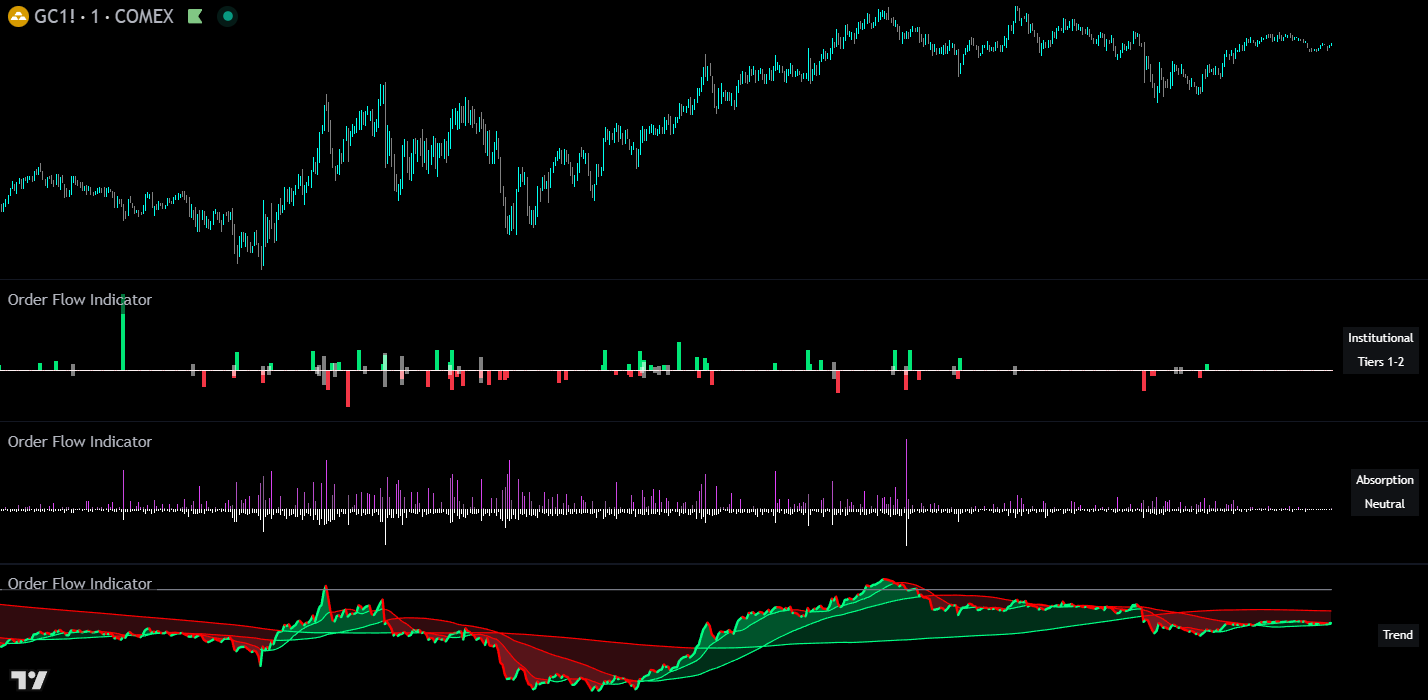
The Order Flow Indicator reveals what’s happening beneath price on TradingView charts. Four tick-data histograms: Institutional Buyer, Buy & Sell Pressure, Absorption, and Neutral Volume combined with a cumulative delta trend line powered by volume footprint data to show directional pressure, absorption, and large order activity for serious day traders and scalpers.
UNDER THE HOOD
The Order Flow Indicator combines five distinct tools in a single package: four tick-data histograms and one volume footprint delta trend line. Each tool can be enabled independently and displayed on separate chart panes for clean analysis.
The institutional buyer histogram identifies and displays large orders that likely represent institutional or professional trading activity. The indicator uses a proprietary classification system with an adaptive algorithm to detect which orders are the most important, automatically calibrating to different instruments and market conditions without manual adjustment.
Large orders are classified by direction:
The tiered filtering system allows you to adjust sensitivity:
An optional Size Filter can be enabled to set an absolute minimum order size in addition to tier filtering, allowing for precise control over which orders are displayed.

Visualizes the total directional pressure within each bar using a proprietary scoring system that weights volume by price impact. The histogram height represents total pressure intensity, while the color gradient ranging from neutral gray to green (buying) or red (selling) indicates how one-sided the activity was. Bars with strong directional conviction display more saturated colors, while mixed or balanced activity remains closer to neutral.
The color intensity is determined by custom adaptive algorithms that compare current activity against recent historical context, providing visual feedback about the strength and conviction of each bar’s order flow.
Detects when significant volume occurs without proportional price movement. High absorption readings suggest that large orders may be getting filled without moving the market, potentially indicating institutional order flow, strong support/resistance levels, or an active battle between buyers and sellers, any of which can signal a coming reversal or exhaustion of the move.
The indicator uses proprietary efficiency calculations and adaptive normalization to compare current absorption against recent historical context, automatically adjusting to different market conditions and volatility.
Displays cumulative volume where price remained unchanged between ticks. Elevated neutral volume may indicate consolidation, indecision, or large orders being executed at a single price level without directional impact. These are typically limit orders where institutional buyers were trying to get their orders filled without moving the markets.
Tracks cumulative directional order flow over time using TradingView’s native volume footprint data. Unlike the four histogram tools which process lower timeframe tick data, the trend line uses footprint data which categorizes volume based on intrabar price movement. This provides significantly more historical depth than tick data. Weeks on minute charts, years on daily charts.
The trend line resets at user-defined intervals (hourly, daily, weekly, etc.), with an additional “None” option that builds continuously without ever resetting to zero for longer-term analysis.
Three time-based moving averages (default: 15min, 1H, 4H) provide trend context. Unlike traditional bar-based MAs, these automatically calculate the appropriate length based on your chart timeframe. Optional color-filled areas show when the trend line is above or below each MA for quick visual reference.
Because the trend line uses TradingView’s built-in volume footprint data, it provides significantly more historical depth than the histogram tools. Minute charts pull weeks of data and daily charts pull years of data.
READING THE DATA
HOW TO TRADE WITH IT
Use the Institutional Histogram to identify when large players are entering the market. Imbalances between institutional buying and selling often precede short-term price movements. Watch for a strong directional bias from large orders and then look for pullbacks to enter positions in the same direction of the large order bias.
Watch for high spikes in absorption after an extended move up or down. This typically represents a reversal is coming or that the move is exhausted and a pullback to fair price areas is likely so trail your stop tightly if you are already in a position or use the absorption spike as a signal to watch for a potential entry near that spike candle.
High absorption readings at key price levels may confirm that orders are being absorbed, strengthening the case for support or resistance. Clusters of absorption can help identify accumulation and distribution zones. These often have price reactions that can be scalped for quick profits by trading back towards where price approached the support/resistance level from.
The Order Flow Trend Line can confirm or diverge from price trends. Strong price moves accompanied by aligned order flow give you more confidence. Divergences between price and cumulative delta may signal weak conviction from traders and indicate a potential reversal is coming.
Filter for only the largest orders (Tier 1) to see when potential institutional players are most active. These rare, significant orders often precede meaningful price moves. When you see a clear bias in direction from the institutional traders, look for pullbacks and then enter a position in the same direction as the large trader bias.
Compare Pressure and Neutral Volume histograms together. High pressure with low neutral volume suggests conviction moves, while high neutral volume with low pressure may indicate consolidation or absorption.
CONFIGURATION
The settings panel is organized with the Order Flow Trend settings first, followed by the histogram data settings and individual histogram controls. The trend line uses its own native footprint volume data and is not affected by the Data Source or Lower Timeframe settings, which only apply to the four histogram tools.
| Setting | Default | Description |
|---|---|---|
| Only Show Data For Confirmed Bars | Off | When enabled, only displays data after bars close to prevent values from updating on open bars |
| Setting | Default | Description |
|---|---|---|
| Smoothing Length | 1 | Apply SMA smoothing to the trend line (1 = no smoothing) |
| Reset Period | 1D | When cumulative values reset. Options: 5min through 1 Year, or None for continuous accumulation |
| MA 1 Timeframe | 15min | First time-based moving average period (can be independently enabled/disabled) |
| MA 2 Timeframe | 1H | Second time-based moving average period |
| MA 3 Timeframe | 4H | Third time-based moving average period |
| MA Fill | On | Optional color fill between trend line and MAs for quick visual reference |
| Setting | Default | Description |
|---|---|---|
| Data Source | (empty) | Analyze order flow from a different symbol (e.g., ES1! while viewing SPY). Leave empty to use the current chart symbol |
| Lower Timeframe | 1T | The granularity of tick data analysis for the four histogram tools. Lower values provide more accuracy but have limited historical depth |
| Setting | Default | Description |
|---|---|---|
| Order Size Tier Filter | Tier 1 & 2 Only | Adjust sensitivity from Tier 1 (largest orders only) through All Tiers (broader detection), or use Size Filter Only mode |
| Only Show Orders Above Filter Threshold | Off | Enable an additional absolute minimum order size filter |
| Order Size Filter Threshold | 15 | Set a specific minimum volume when the size filter is enabled |
| Color Settings | Green / Red / White | Customize buy, sell, and neutral order colors |
GOOD TO KNOW
POWER USER TIPS
GET ACCESS
Access the full Order Flow Pro Suite on your TradingView charts – all 4 indicators with volume footprint data and priority support.
COMMON QUESTIONS
CHANGELOG
Updated the footprint data call parameters to improve performance on tickers with large amounts of ticks per bar.
This update completely overhauled the Order Flow Trend Line with a new, far more accurate data source and reorganized the settings panel for a cleaner experience. All histogram tools remain unchanged.
EXPLORE THE SUITE
Order Flow Pro
Scores each candlestick directly on your price chart with a directional grade based on its internal order flow composition. Pairs naturally with the Order Flow Indicator’s histogram analysis.
Order Flow Pro
Detects and visualizes institutional buying and selling activity with a different methodology. Use it alongside the Order Flow Indicator’s institutional buyer histogram for cross-confirmation.
Order Flow Pro
Identifies supply and demand zones where institutional orders were previously executed. Combine with the Order Flow Indicator’s absorption histogram to confirm when price returns to these levels.