
Major overhaul upgrading to Pine Script v6 with a completely new adaptive volume spike classification system, per-timeframe and per-ticker controls, scanner level touch detection, labels on every level, and 4 new alert types.
Volume Based Auto Support & Resistance tracks large market maker orders across multiple timeframes and draws support and resistance levels based on where those orders came in. The indicator uses an adaptive weighted volume tracking system to qualify and classify volume spikes into three tiers: Large, Huge, and Massive, giving you a clear hierarchy of which levels are most likely to produce price reactions.
Each level is labeled with its timeframe and spike classification, and every timeframe can be independently configured to show all qualifying levels or only the most significant ones. A built-in multi-ticker scanner monitors up to 7 additional tickers for both volume spikes and level touches, alerting you when institutional activity or price reactions occur across your watchlist.
WHAT IT DOES
The indicator uses an adaptive volume tracking system to qualify and classify volume spikes from each higher timeframe bar:
Each timeframe can be independently configured to show all three levels, only Huge and Massive, or Massive only. For the cleanest charts with only the most significant levels, set all timeframes to Massive only.
Each support or resistance level includes a label showing the timeframe and spike classification. “L” next to the timeframe means Large, “H” means Huge, and “M” means Massive. Labels can be customized: toggle on/off, change text and background color, adjust text size, and control how many bars the labels offset to the right of the current chart bar.
The indicator scans multiple higher timeframes for volume spikes. Each timeframe can be independently toggled on or off and configured for which spike sizes to display. Make sure all timeframe settings are higher than your chart timeframe. A warning appears at the top of the chart if any timeframe is set lower than the chart.
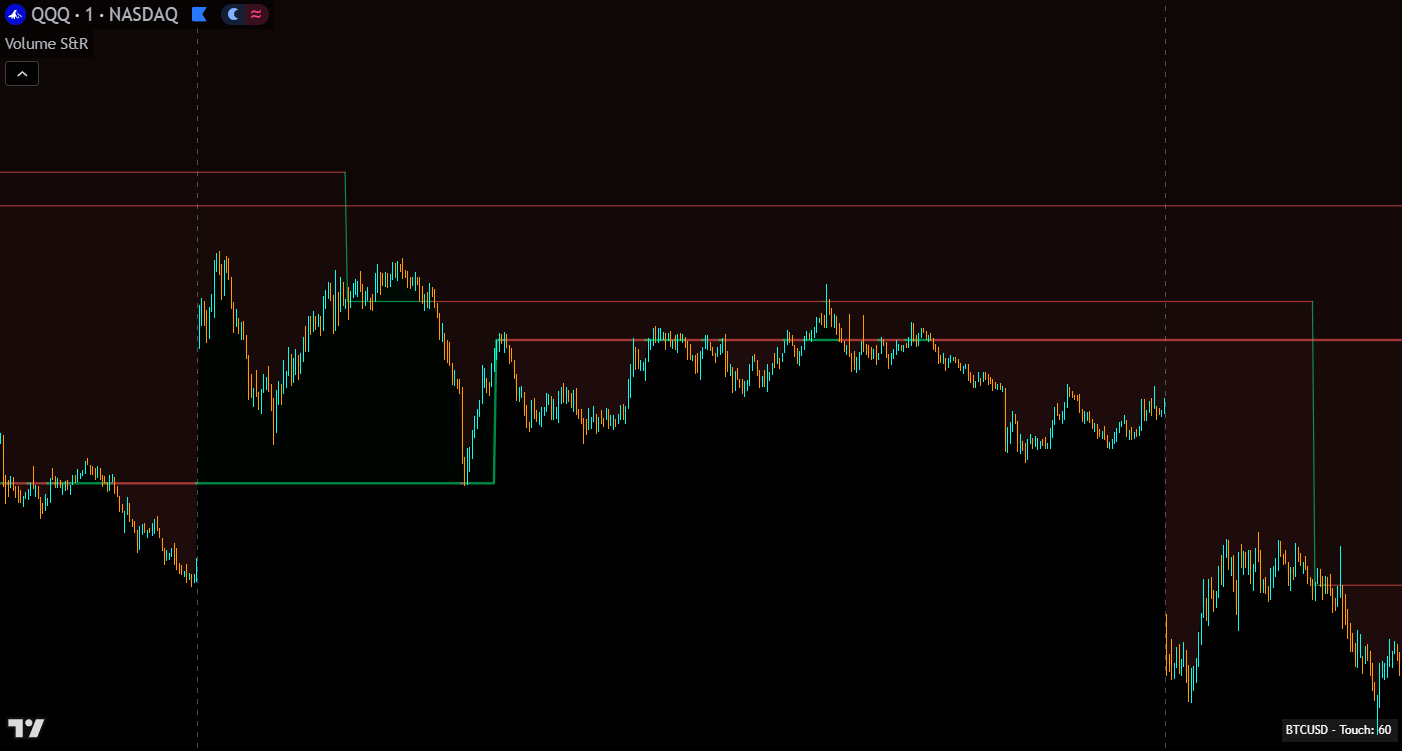
Lines track where large market maker orders come in and dynamically adjust as new volume spikes occur. When the lines converge toward the current price (“suck up to price”), it shows where volume is entering the market, typically signaling an imminent reversal or accelerated trend continuation. When all levels converge and change color simultaneously, it indicates market sentiment is shifting and a trend reversal is likely.
Lines color green when acting as support and red when acting as resistance. Line and fill colors for support and resistance are independently customizable.
HOW TO TRADE WITH IT
Look for bounces off of Huge and Massive levels. These represent where market makers placed their largest orders and consistently produce strong price reactions. The higher the spike classification, the more significant the expected reaction.
When the lines converge toward the current price, large orders are coming in at that area. This typically means a reversal is about to happen. If the reversal doesn’t materialize, the trend usually continues in its original direction but moves faster. Wait for levels to converge before trying to buy bottoms or sell tops. This patience keeps you out of choppy price action and gives you entries that move quickly.
When all levels converge and all colors change from green to red (or red to green), market sentiment is shifting. This is a strong reversal signal that applies across all timeframes being tracked.
If price breaks out from the group of levels and no lines converge toward the price, it’s a low-volume breakout. Price usually comes right back to the support and resistance levels in these situations, be cautious.
Look at higher timeframes and draw horizontal lines where the Massive levels extend for a long period. These persist as important levels on lower timeframe charts and give you major zones that price is likely to bounce from.
Use charts from exchanges with the highest volume and most institutional buyers for better levels: NYSE, ARCA, and NASDAQ for stocks; COINBASE, BINANCE, MEXC perpetual futures, or PEPPERSTONE for crypto.
MULTI-TICKER-MONITORING
The built-in scanner monitors up to 7 additional tickers for both volume spikes and level touches. When a volume spike is detected on any enabled timeframe for any enabled scanner ticker, the scanner table shows which ticker and timeframe produced the spike. When a chart timeframe candle touches a support or resistance level on any scanned ticker, the scanner shows which level is being touched.
The scanner can be configured to show volume spikes only, level touches only, or both. This setting also affects which alerts fire. Each scanner ticker can be independently toggled on or off.
Customize the scanner table position, text and background colors, and the number of candles that each scanner alert persists for.
CONFIGURATION
| Setting | Default | Description |
|---|---|---|
| Timeframe On/Off | Varies | Toggle each timeframe on or off. Affects both chart levels and scanner results |
| Spike Level Filter | All | Per timeframe: show Large + Huge + Massive, Huge + Massive only, or Massive only. Massive gives the cleanest charts with the most important levels |
| Higher Timeframe Selection | Varies | Select which higher timeframes to scan. Default optimized for 1-minute charts. Update when using higher chart timeframes |
| Setting | Default | Description |
|---|---|---|
| Scanner On/Off | On | Toggle the entire scanner table |
| Scanner Display Mode | Both | Show volume spikes only, level touches only, or both. Also affects which alerts fire |
| Scanner Tickers (1–7) | Varies | Up to 7 tickers, each independently toggleable. Input tickers from a sector to monitor the sector as a whole |
| Alert Candle Duration | 3 | Number of candles each scanner alert stays visible in the table |
| Table Position / Colors / Text Size | Varies | Customize scanner table position, text color, and background color |
STAY NOTIFIED
Available alert conditions:
The scanner display mode setting (volume spikes only, level touches only, or both) also controls which alert types are active.
MARKETS & TIMEFRAMES
The indicator works on all markets with volume data including stocks, crypto, futures, and forex. It can be used on any timeframe as long as there is enough data for the session used. The default higher timeframe settings are optimized for the 1-minute chart. Update them when using higher chart timeframes.
For best results, use charts from exchanges with the highest volume and most institutional participation.
GOOD TO KNOW
POWER USER TIPS
GET ACCESS
Access the full Premium Indicator Suite on your TradingView charts. All 10 indicators, chart templates, and priority support.
COMMON QUESTIONS
CHANGELOG
Major overhaul upgrading to Pine Script v6 with a completely new adaptive volume spike classification system, per-timeframe and per-ticker controls, scanner level touch detection, labels on every level, and 4 new alert types.
EXPLORE THE SUITE
Premium Suite
Uses four types of levels: volume spikes, OHLC candles, trading sessions, and VWAP for a broader view of reversal zones. Complement Volume Based Auto S&R with session and OHLC levels that this indicator doesn’t cover.
Premium Suite
Generates buy and sell signal arrows across three trading modes. Take signal entries at volume-validated S&R levels for the highest probability trades with clear stop loss placement at the level boundary.
Premium Suite
A smoothed 6-oscillator trend strength indicator with momentum confirmation. Use the ribbon to confirm direction when price reaches volume-based S&R levels for added confluence before entering.