
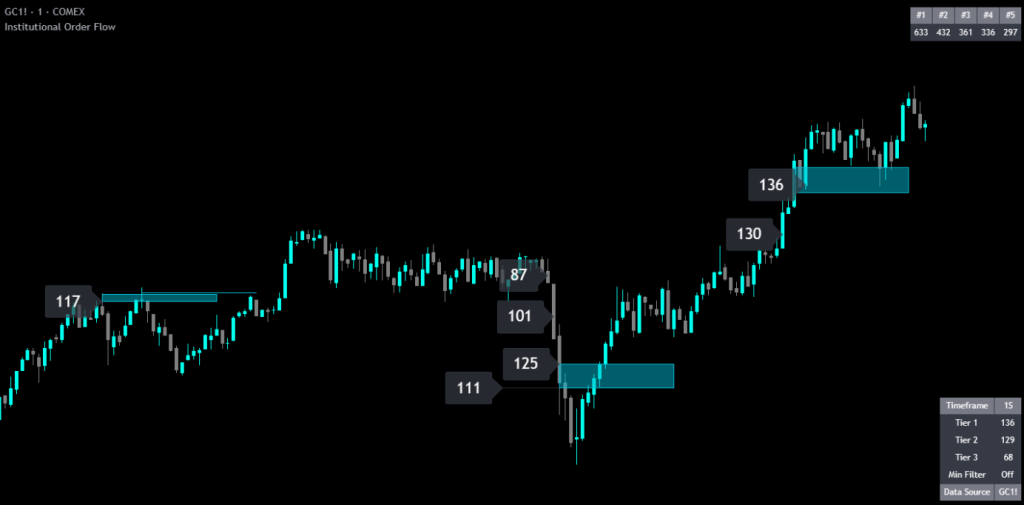
Improved reliability when pulling data from external tickers, overhauled real-time label handling, and added independent controls for top order table entries versus chart labels.
Institutional Order Flow is a TradingView indicator that detects large orders inside every candle using an adaptive threshold algorithm and a four-tier classification system. Built for futures and equities day traders who want to see where institutional participants entered and defended positions without manual tuning per instrument.
The indicator employs a proprietary adaptive algorithm that dynamically calculates volume significance thresholds based on recent market conditions. Rather than relying on static thresholds that require constant manual adjustment across different instruments, this indicator automatically adapts to the unique volume characteristics of whatever you’re trading. What qualifies as a “large order” on ES futures is vastly different from crude oil or gold. This indicator handles that distinction automatically using custom formulas that identify orders representing significant institutional activity.
Tesla 1-minute chart:
MES 1-minute chart:
Silver 1-minute chart:
UNDER THE HOOD
The core innovation of this indicator is its proprietary method for determining what constitutes a significant order across varying degrees of trading thresholds. The algorithm continuously analyzes recent market activity and calculates dynamic thresholds that adapt to current conditions. During high-activity sessions, thresholds adjust accordingly; during quieter periods, they recalibrate. This means the indicator remains effective across all market conditions without manual reconfiguration.
Orders are classified into four distinct tiers based on their significance relative to recent activity:
You control which tiers are displayed, allowing you to focus on only the most exceptional orders or cast a wider net to see more activity. Each tier has its own customizable text size, creating an immediate visual hierarchy where the most significant orders are the most prominent.
The indicator maintains a separate tracking system that records the largest orders detected across your entire chart history of available data. Unlike the tier thresholds which adapt to recent conditions, the Top Orders table shows you the absolute biggest orders ever seen on the chart, giving you a historical reference point for exceptional institutional activity.
The largest orders are also displayed directly on the chart as orange labels with their rank, making it easy to see which orders were the biggest and where price is likely to react. The number of top order labels displayed on the chart and the number of orders shown in the table can be controlled independently. This allows you to show just a few of the largest order sizes in the table for quick reference while displaying more of the biggest order labels on the chart so they are easy to spot. The default displays the top 20 largest order labels on the chart.
Areas of Interest are zones detected as having significant concentrated institutional activity. When the indicator identifies a cluster of large orders in a tight price range, it draws a box on the chart showing exactly where the majority of institutional activity took place.
Use these boxes as entry or exit zones. Price is likely to have a reaction when it returns to these areas since institutional participants will be defending or adding to their positions. Combine with price action to confirm your trades.
The sensitivity setting controls how many Areas of Interest are displayed. Lower numbers show more zones but with less certainty of strong price reactions. Higher numbers show fewer zones with higher confidence. The default is calibrated for 1-second data on a 1-minute chart. Adjust to suit your preference and chart settings.
Each detected order is classified by direction based on price movement. Since TradingView does not provide native directional order data (buy vs. sell), the indicator determines direction by comparing the close price of each lower timeframe bar to the previous close:
This provides a practical approximation of order direction within the limitations of available data.
It is important to note that price could have moved up or down based on the order book and current available orders, so the classification of buy and sell orders based on price movement is not 100% accurate. The data TradingView provides also does not include entry or exit order classification, so any order shown could be an entry or an exit from a position. To avoid potentially inaccurate directional data, turn off the “Color Labels By Direction” setting.
The indicator includes two complementary label shifting systems to keep your chart clean and readable:
Analyze volume from one instrument while viewing price action on another. This is particularly useful when trading micro contracts where the full-size counterpart has more reliable institutional order detection due to higher liquidity.
THE PROCESS
The indicator requests data from a timeframe smaller than your chart timeframe using TradingView’s lower timeframe data functions. For example, on a 5-minute chart with tick data selected, the indicator retrieves every individual trade that occurred within each 5-minute candle.
This granular data is processed through a proprietary adaptive algorithm that:
The adaptive nature of the threshold calculation ensures thresholds remain meaningful regardless of the instrument, trading session, or market environment. No manual tuning required.
HOW TO TRADE WITH IT
The most effective approach involves patience and precision.
When you observe multiple Tier 1 or Tier 2 orders occurring at similar price levels, this creates a cluster zone of significant institutional interest. These clusters often represent areas where large participants have accumulated or distributed positions. Mark these levels for future reference and place entries in the direction of the large buyers with your orders at or very close to the same price of the large orders. Many times these institutional buyers will defend their orders and price will have a significant reaction from those price levels that you can take advantage of.
When price approaches a previously established cluster zone, look for a bounce trade in the direction that price approached from:
Areas of Interest boxes highlight zones where concentrated institutional activity was detected. When price returns to these zones, watch for reactions. Institutional participants who entered at these levels will often defend or add to their positions. These zones are excellent for scalp entries, especially when combined with price action confirmation like large wicks or candlestick patterns at the zone boundary.
For additional confirmation, consider using two instances of this indicator pulling Tier 1 data from correlated markets. For example, monitoring both ES and NQ or NQ and MNQ for significant orders can reveal when institutional activity is occurring across multiple indices simultaneously, providing stronger confluence for your trade decisions.
CROSS MARKET ANALYSIS
The Data Source setting allows you to analyze volume from a related instrument while viewing price on another. Common applications:
This provides cleaner institutional order detection since full-sized contracts typically have higher volume and more obvious large order activity.
Another way to use this feature is to add a second instance of the indicator to your chart and set the second one to another similar asset so you can see coordinated trading across different tickers such as GC and MGC, NQ and MNQ, ES and MES, or you can mix and match by looking at data from NQ and ES on the NQ chart. Change the label and info table text colors of the second indicator to a different color to be able to tell the difference between which ticker each order came from.
How labels are drawn with external data sources: When you set the data source to a different ticker, the indicator looks for institutional orders on the external ticker and then draws the label at the price the chart ticker was at when the institutional order came in. For example, if you are pulling data from ES when viewing an NQ chart and a Tier 1 order comes in while NQ is at $26,634, the label will appear with the order size from ES at $26,634 on the NQ chart on the exact bar that it happened.
CONFIGURATION
| Setting | Default | Description |
|---|---|---|
| Label Style | Left | Controls label positioning relative to bars (Left, Right, Center, Above, Below) |
| Data Source | (empty) | Optionally specify a different symbol for volume analysis (e.g., ES1! while viewing MES) |
| Lower Timeframe | 1S | Granularity for data collection. 1S (1-second) provides more history than tick data. Use 1T for maximum accuracy with less history |
| Order Tiers to Display | 1 & 2 | Choose which tier levels appear on your chart (Tier 1 through Tier 4) |
| Order Size Filter | Off | Optional absolute minimum volume threshold (works in combination with tiers) |
| Color Labels By Direction | Off | Toggle directional coloring (green/red/neutral) on or off. Off by default since the default LTF is 1S rather than tick data |
| Setting | Default | Description |
|---|---|---|
| Areas of Interest On/Off | On | Enable or disable Areas of Interest zone boxes |
| Sensitivity | 3 | Lower numbers show more zones with less certainty; higher numbers show fewer zones with higher confidence. Default is calibrated for 1S data on a 1-minute chart |
| Box Color | Aqua | Color of the Areas of Interest zone boxes |
| Box Border Color | Aqua | Border color for zone boxes |
| Box Border Line Width | 1 | Thickness of box border lines |
| Box Extension (Bars) | 20 | How many bars to the right each zone box extends |
The Info Table displays real-time information including the current lower timeframe being analyzed, current threshold values for Tier 1, Tier 2, and Tier 3, size filter status (value or “Off”), and the data source symbol being used. Fully customizable position, colors, and text size.
| Setting | Default | Description |
|---|---|---|
| Number Of Top Orders In Table | 5 | How many of the largest orders to display in the Top Orders table (1–20). Use a smaller number for quick reference |
| Number Of Top Order Labels On Chart | 20 | How many of the largest orders to display as orange ranked labels on the chart. Controlled independently from the table count so you can show more labels on the chart for easy spotting |
| Table Position | Top Right | Position of the Top Orders table on the chart |
| Colors & Text Size | Varies | Customize table background, text colors, and font size |
GOOD TO KNOW
GET ACCESS
Access the full Order Flow Pro Suite on your TradingView charts – all 4 indicators with volume footprint data and priority support.
COMMON QUESTIONS
CHANGELOG
Improved reliability when pulling data from external tickers, overhauled real-time label handling, and added independent controls for top order table entries versus chart labels.
Added a new feature that detects zones of concentrated institutional activity and displays them as box overlays on your chart.
Fixed a small bug with real-time updates.
Updated defaults to show only the most important data and added ranked top order labels directly on the chart.
Fixed price coordinate issue when pulling data from other tickers. When using an external data source, labels are drawn at the chart ticker's price at the time the institutional order occurred on the external ticker — not at the external ticker's price.
Fixed a small bug when pulling data from other charts.
EXPLORE THE SUITE
Order Flow Pro
Five analysis tools including buy/sell pressure, absorption, neutral volume, institutional buyer histogram, and cumulative volume delta trend line. Shows the broader order flow dynamics that complement individual institutional order detection.
Order Flow Pro
Identifies ranked institutional order block levels across three tiers from multiple timeframes. Combine with Institutional Order Flow to verify which levels have the heaviest large-order concentration.
Order Flow Pro
Scores each candlestick on your price chart with a directional grade based on its internal order flow composition. Use alongside institutional order labels to confirm the overall directional bias at large-order levels.