
Free Indicator

Indicator Direction Table for TradingView

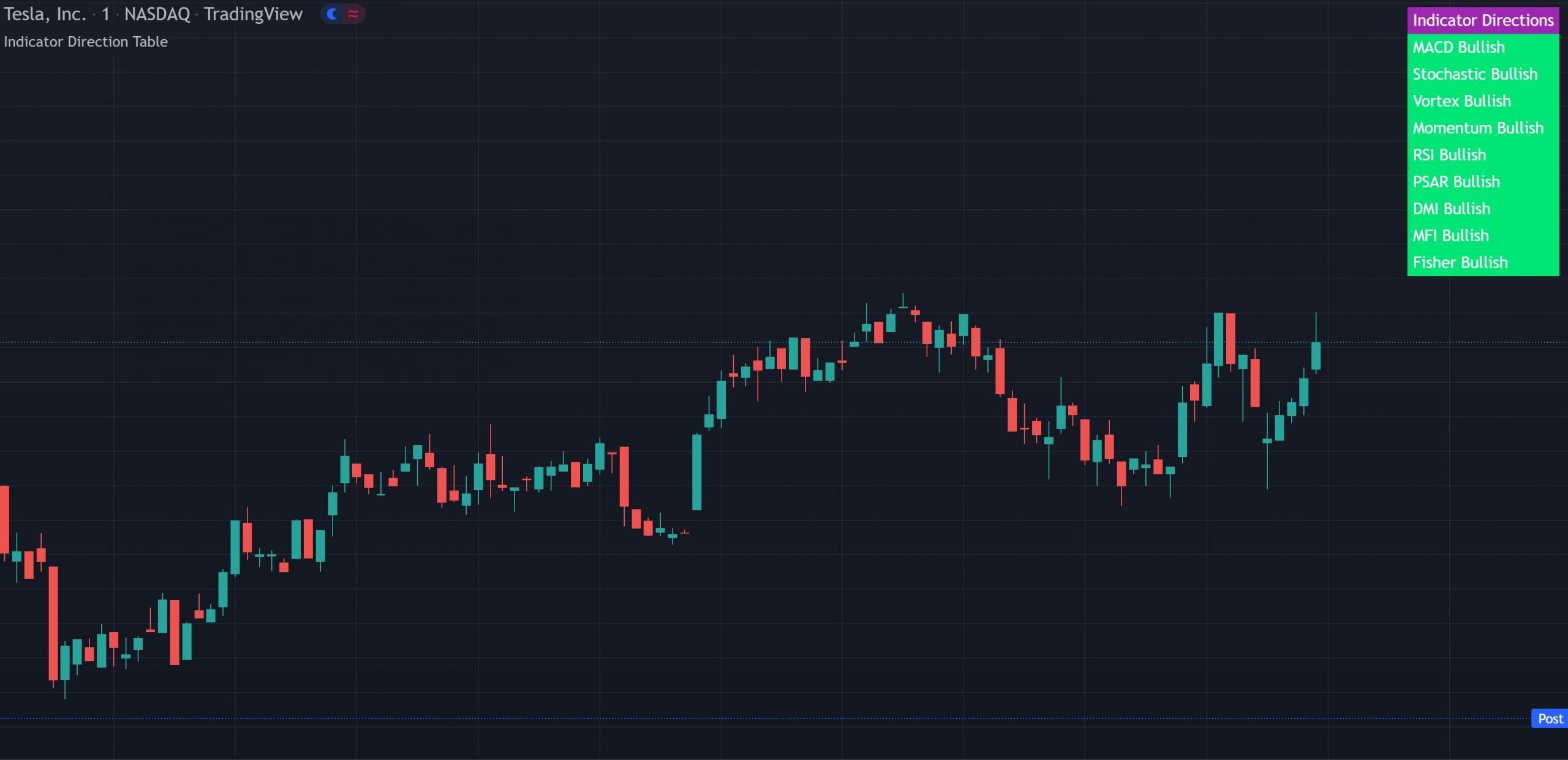
Indicator Direction Table showing bullish, bearish and neutral labels for 9 popular indicators including MACD, RSI, DMI and MFI on a TradingView chart

The Indicator Direction Table shows the live bullish, bearish, or neutral state for 9 popular indicators in a single on-chart table. Each label updates in real time as the indicator shifts. Toggle and reorder any of the 9 indicators, set an all-agree alert, and use it on any market or timeframe. Free on TradingView.

Built by Lane Dotson · Last updated · View on TradingView →
This is a free indicator - Add it to your TradingView charts at no cost.
Add to TradingView →

WHAT IT DOES

Core Features

A real-time trend direction table for 9 popular indicators giving you an instant consensus read without having to analyze each indicator individually.

9-Indicator Trend Table

The table displays the current bullish, bearish or neutral direction for each of the following indicators: MACD (Moving Average Convergence Divergence), Stochastic RSI, Vortex Indicator, Momentum, RSI (Relative Strength Index), PSAR (Parabolic Stop & Reverse), DMI (Directional Movement Index), MFI (Money Flow Index) and Fisher Transform. Each label changes color in real time as the indicator’s direction shifts. Green for bullish, red for bearish, blue for neutral.

All-Agree Alerts

You can set alerts for when the entire table of indicators is bullish or bearish at the same time. When all 9 indicators agree on direction, it represents a strong consensus signal that the market is trending in that direction.

Individual Indicator Controls

Each of the 9 indicators can be individually turned on or off and reordered so they show up in the order you choose. This lets you customize the table to only include the indicators you care about and arrange them in your preferred priority.

Customizable Lengths & Values

The length and other values for each indicator can be customized to suit your preferences. By default, all indicators are set to the normal default settings that TradingView supplies, typically 14 as the length. The table position can also be moved to different areas of the chart.

INTERPRETATION GUIDE

How to Read the Table

Label Colors

When to Trade

Look for the entire table to turn green or red before taking positions. When all enabled indicators agree on direction, you have the strongest consensus signal. When the table is mixed, the indicators are giving conflicting signals and it’s best to wait for alignment. The all-agree alert will notify you when this happens without watching the table.

CONFIGURATION

Settings Overview

Each indicator has its own settings for length and values. The table itself can be repositioned and toggled.

Main Settings

Setting Default Description
Indicator Lengths 14 (typical) Length and values for each of the 9 indicators. All default to TradingView's standard settings.
Indicator On/Off All On Toggle each of the 9 indicators individually. Only enabled indicators are required to agree for the all-agree alert.
Indicator Order Varies Reorder the indicators so they display in your preferred priority within the table.
Table Position Top Right Move the table to different areas on the chart.
Table On/Off On Toggle the entire indicator table on or off.

GOOD TO KNOW

Important Notes & Limitations

The table shows direction only. It does not display the actual values of each indicator. For detailed indicator data, use the individual indicators on your chart alongside the table.
MFI requires volume data. Tickers without reported volume may not display an accurate MFI direction.

FREE ON TRADINGVIEW

Indicator Direction Table is Free to Use

Add it to your TradingView charts and start reading multi-indicator consensus at a glance today. No subscription required.

100% Free
No Account Required
All Future Updates

COMMON QUESTIONS

Frequently Asked Questions

MACD, Stochastic RSI, Vortex, Momentum, RSI, Parabolic SAR, DMI, MFI and Fisher Transform. Each can be individually toggled on or off and reordered in the settings.
Green means that indicator is currently bullish. Red means bearish. Blue means neutral, the indicator is not showing a dominant direction. Look for all labels to turn the same color for the strongest consensus signal.
Yes. You can set alerts for when the entire table is bullish or bearish. Only the indicators that are currently turned on need to agree for the alert to trigger.
Yes. The length and other values for each indicator can be customized. By default all are set to TradingView's standard settings, typically 14 as the length. You can also reorder the indicators and move the table position.
It works on all markets including stocks, crypto, futures and forex, and on all timeframes. Note that MFI requires volume data, so tickers without volume may not show an accurate MFI reading.

CHANGELOG

Release Notes

Individual Controls & Reordering

Added the ability to turn off each individual indicator and reorder them to display in your preferred order, with instructions on how to use the new settings.

What Changed
Added ability to turn off each individual indicator
Added ability to reorder indicators in the table
Added instructions on how to change the new settings properly

EXPLORE MORE

Related Indicators

Free

Full DMI and Fisher Transform indicator in one pane with caution dots and labels. When the direction table shows both DMI and Fisher as bullish or bearish, this gives you the detailed data behind those readings.

Free

Combines MFI, RSI and Momentum into a single trend label. Three of the nine indicators in the direction table. Use this for a focused view of their combined signal.

Free

Multi-indicator sector scanner using MOM, RSI, MFI, DMI and MACD across sectors. Complements the direction table by showing the same indicator types applied across multiple markets.