
First public release of the Portfolio Tracker with individual and total PnL tracking for up to 12 assets, portfolio weight, daily change and color-coded values.
Portfolio Tracker is a free TradingView indicator that tracks real-time profit and loss for up to 12 assets directly on your chart. Enter each ticker, order size, and purchase price, and the table shows individual PnL, portfolio weight, and daily change with color-coded green/red values.
WHAT IT DOES
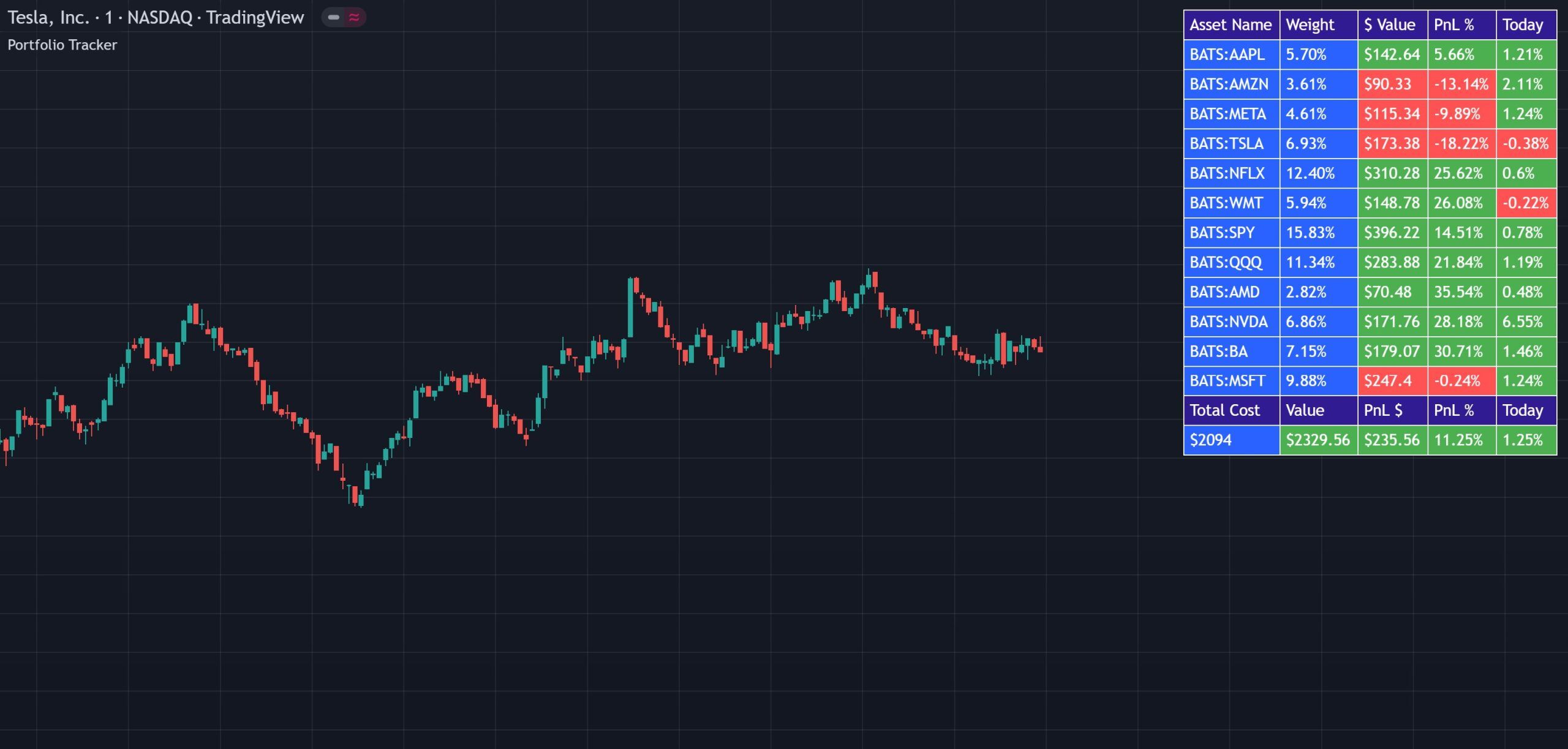
A real-time portfolio tracking table that shows individual and total profit/loss, portfolio weight and daily change for up to 12 assets, all color-coded directly on your chart.
The top section of the tracker shows each asset in your portfolio individually with the following data: ticker name, portfolio weight as a percentage of your total holdings, current dollar value of that position, profit or loss from your purchase price in percentage, and today’s change compared to yesterday’s close in percentage. The dollar value, PnL % and Today % all change color from green to red depending on whether they are in profit or not.
The bottom section gives you a portfolio-wide view with: total cost of your entire portfolio in dollars, current value of your entire portfolio in dollars, current profit or loss in dollars, current profit or loss in percentage, and today’s change of your entire portfolio value compared to yesterday’s close in percentage. The dollar value, PnL $, PnL % and Today % all change color from green to red depending on profitability.
Go into the indicator settings and set each ticker, how much you purchased and at what price. Turn off any tickers you don’t need. Once configured, the tracker table appears on your chart with all data updating in real time. The table can be toggled on or off to save your portfolio info while keeping the chart clean during trading, and the table position is adjustable.
INTERPRETATION GUIDE
Go into the indicator settings. The first option lets you toggle the tracker table on or off. It saves your portfolio data even when hidden. The second option lets you move the table position.
For each of the 12 available slots, set the ticker symbol (stock, crypto, etc.), the amount you purchased and the price you purchased at. Turn off any tickers you don’t need.
CONFIGURATION
The tracker has a simple setup, configure each asset and control the table display.
| Setting | Default | Description |
|---|---|---|
| Ticker (per slot) | Varies | The stock, crypto or other asset to track. Up to 12 slots available. |
| Order Size (per slot) | 1 | How much of that asset you purchased (number of shares or coins). |
| Purchase Price (per slot) | Varies | The price you purchased the asset at. Used to calculate PnL. |
| Ticker On/Off (per slot) | On | Toggle each individual asset on or off in the tracker. |
| Table On/Off | On | Toggle the entire tracker table on or off. Portfolio data is saved even when hidden. |
| Table Position | Top Right | Move the tracker table to different areas on the chart. |
GOOD TO KNOW
FREE ON TRADINGVIEW
Add it to your TradingView charts and start tracking your portfolio profit and loss in real time today. No subscription required.
COMMON QUESTIONS
CHANGELOG
First public release of the Portfolio Tracker with individual and total PnL tracking for up to 12 assets, portfolio weight, daily change and color-coded values.
EXPLORE MORE
Free
Scan up to 10 tickers for volume, volatility, oscillators, daily levels and VWAP. Use alongside the portfolio tracker to monitor trading conditions on the assets you’re holding.
Free
Multi-indicator sector scanner across 9 tickers. Track sector-wide momentum for the markets your portfolio is exposed to.
Free
DCA strategy backtester for crypto and stocks. If you’re building positions with dollar-cost averaging, backtest your strategy before committing capital.