
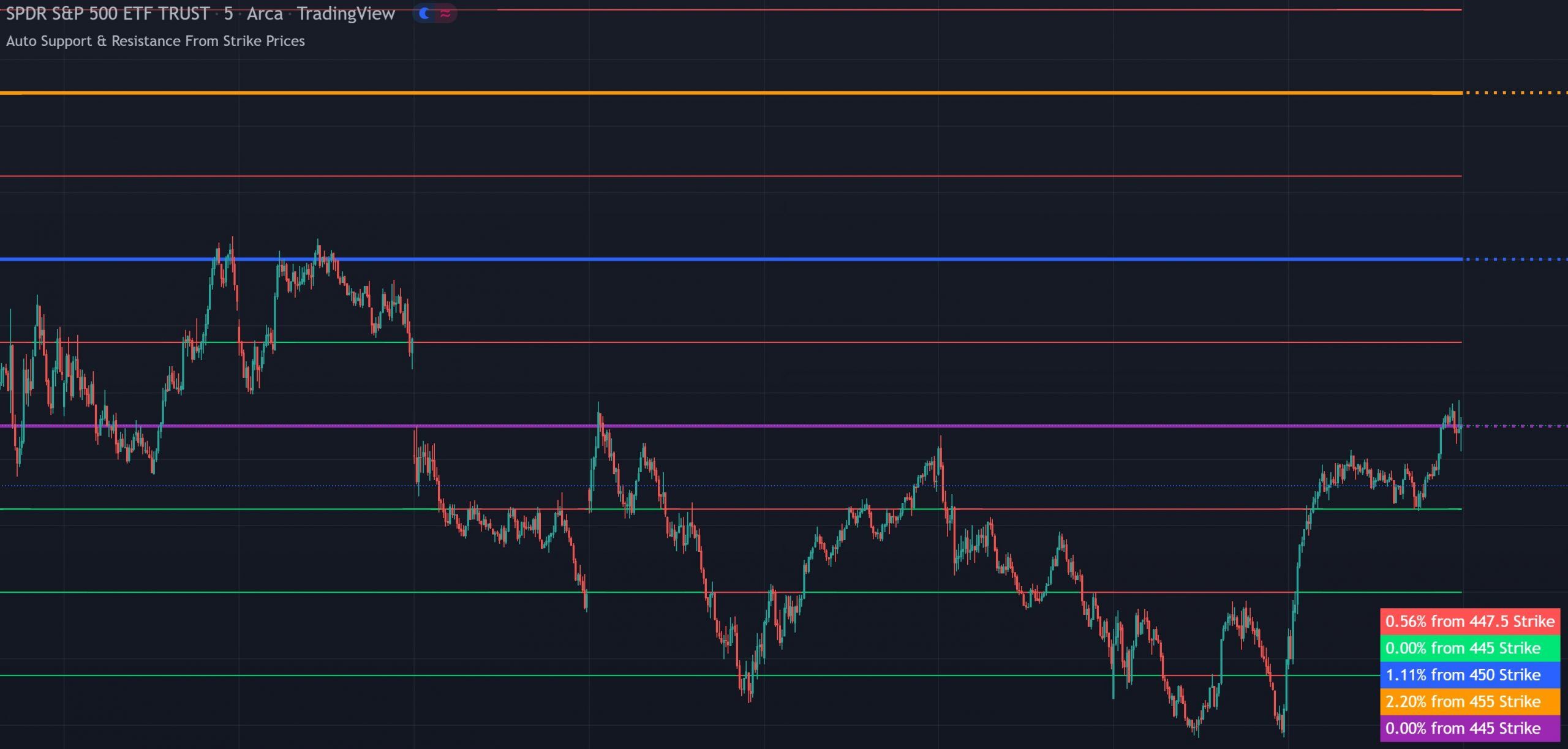
Added alerts for all levels, major level highlights for high open interest strike prices with percentage updates, extendable lines and additional customization options.
Options Strike Price Support & Resistance auto-plots 15 levels above and below the current price based on options strike price gaps or psychological round numbers. Each level updates its color and percentage distance in real time, with major level highlights and alerts built in. Free on TradingView for all markets and timeframes.
WHAT IT DOES
Automatic support and resistance levels generated from options strike prices or psychological round numbers, with color-coded lines, a percentage gap table, major level highlights and alerts.
Set your starting level and strike price gap for any ticker and the indicator automatically plots 15 levels above and 15 levels below the current price. For options-active tickers like SPY, set the gap to the strike price increment (e.g., 2.5). For crypto or other assets without options chains, use psychological round numbers instead such as 500 or 1,000 for BTC, or .25 and .50 for smaller-priced coins.
If price is above a level, it paints green, acting as support. If price is below a level, it paints red, acting as resistance. The colors update dynamically as price crosses levels, so you always have an instant visual read on which levels are support and which are resistance. You can customize all support and resistance line colors at once from a single setting.
A real-time table shows how far the current price is from the nearest support and resistance levels, so you always know your risk-to-reward ratios before entering a trade. Each row is color-coded to match its corresponding support or resistance line. The table can be repositioned on the chart or turned off.
You can designate major strike price levels(typically where open interest is highest) and the indicator will highlight them separately with their own percentage gap updates. This helps you identify the strike prices that are most likely to act as magnets or walls for price.
The indicator includes alerts for each support and resistance level. Turn on TradingView alerts to get notified when price crosses key strike price levels without watching the chart.
SETUP GUIDE
Go into the indicator settings and set the starting level to the nearest round number or strike price for the ticker you’re trading. If you’re trading SPY near 450, set the starting level to 450. If you’re trading SQQQ near 38, set it to 38. For crypto, use the nearest psychological number like 40,000 for BTC, 2,500 for ETH, 16.50 for LINK.
Set the gap between levels to match the options strike price increments for that ticker. For SPY, this is 2.5. For SQQQ, it’s 1. For crypto or assets without options chains, use psychological price increments like 500 or 1,000 for BTC, 100 or 250 for ETH, or decimals like .25 or .50 for smaller-priced coins.
CONFIGURATION
The indicator has a straightforward set of options. Here’s what you can configure in the input settings.
| Setting | Default | Description |
|---|---|---|
| Starting Level | 0 | The center price level or strike price to build the grid from. Set to the nearest round number or strike price for the ticker you're trading. |
| Strike Price Gap | 1 | The price increment between each level. Match this to the options chain strike price gap for the ticker, or use psychological increments for crypto. |
| Lines On/Off | On | Toggle the support and resistance lines on or off. |
| Extend Lines | Varies | Extend the support and resistance lines across the full chart width. |
| Support/Resistance Colors | Green / Red | Change the color of all support or all resistance lines at once from a single setting. |
| Line Width | Varies | Adjust the thickness of all support and resistance lines at once. |
| Major Levels | Off | Set specific high open interest strike prices as major levels with their own percentage gap updates. |
| Percentage Table | On | Toggle the percentage gap table on or off. |
| Table Position | Bottom Right | Move the percentage gap table to different areas on the chart. |
GOOD TO KNOW
FREE ON TRADINGVIEW
Add it to your TradingView charts and start trading with strike price levels today. No subscription required.
COMMON QUESTIONS
CHANGELOG
Added alerts for all levels, major level highlights for high open interest strike prices with percentage updates, extendable lines and additional customization options.
EXPLORE MORE
Free
Auto fibonacci retracement and extension levels from the previous day, week, month, quarter or year. Layer with strike price levels to see where fibonacci zones and options-based support/resistance overlap.
Free
Automatic support and resistance levels based on wick rejections. Use alongside strike price levels to confirm which levels have actual price rejection history behind them.
Free
Volume profile with buy and sell pressure labels. Complements strike price levels by showing where the most volume has traded, helping you identify which strike price zones carry the most weight.